Updated on 2024-01-02: We have recently published an Ethereum Key Manager API client for Python:
The Full documentation is available at https://eth-2-key-manager-api-client.slingnode.com/
PyPi package: https://pypi.org/project/eth-2-key-manager-api-client/
GitHub repository: https://github.com/SlingNode/eth-2-key-manager-api-client/
In my quest to learn running Ethereum infrastructure I reached a point of setting up my first validator. Since this post is about the key manager API we will skip right to it. Once a validator client is running (which requires an execution client and a beacon client) we need to create a key or a set of keys, that the the validator will use to perform its duties as well as the corresponding “deposit data” that we’ll use at the Ethereum Staking Launchpad. To be more precise we create an EIP-2335 format BLS12-381 keystore. There’s a command line utility maintained by the Ethereum project to do just that -> https://github.com/ethereum/staking-deposit-cli.
The staking-deposit-cli creates two files:
- deposit_data-*.json
- keystore-*.json
Creating the keystore is out of the scope of this article but I feel obliged to mention that the the mnemonic is very sensitive and the keystore in combination with the password are at the very least sensitive and should be handled as such. Do follow the security best practices for creating and managing cryptographic keys when handling them.
So now we have:
- validator client running on a server
- keystore and the corresponding password
We need to get the keystore to the server and import it into the running validator client. Each client has its own way of doing it interactively. In our example we’ll use Lighthouse.
Once we’ve copied the keystore to the validator node, we can import it using the following command:
lighthouse account validator import --datadir /var/lib/lighthouse --directory /validator_keys/ --network goerliLighthouse will ask us to enter a password as shown below:
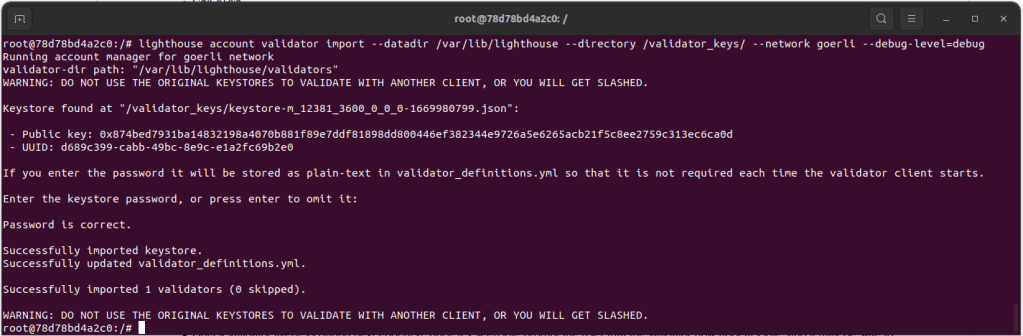
Since we are all about automation and doing everything aaC (as a Code), interactive prompts are not ideal suffice to say.
The second option is to save the password in plain text on the validator server and use –password-file flag.
lighthouse account validator import --datadir /var/lib/lighthouse --directory /validator_keys/ --network goerli --password-file /validator_keys/pass.txt --reuse-password Since we don’t have to enter the password manually that’s better automation-wise. We could for example store the password in a secrets management tool such as HashiCorp Vault, use Ansible to retrieve it, save it to the disk, trigger the import and delete the file.
For now let’s dismiss the fact that Lighthouse save the password in clear text in the validator_definitions.yml file on the same disk.
Now we know how to import the keystore using the Validator Client (VC) specific interface. This brings us to the topic of this post. The Key Manager API.
Ethereum Key Manager API is a REST interface implemented by Validator Clients that enable keystore management. The API specification can be found in this Github repo https://github.com/ethereum/keymanager-APIs. API browser is available here: https://ethereum.github.io/keymanager-APIs/#/. As of writing all VCs and Web3Signer implement the API providing a standard interface to manage the keys.
We will use Postman to interact with the API. I’ve already downloaded and imported (in Postman, click create new API and import from file) the OAPI definition file from here: https://github.com/ethereum/keymanager-APIs/blob/master/keymanager-oapi.yaml. I have also set the relevant variables (base_url, server_url, bearerToken) in the Environments in Postman. The API calls are autheticated using a bearer token. Lighthouse VC automatically generates and saves the bearerToken in the api-token.txt file located in the validators directory.
Local Keystore
Local kyestore is stored and managed locally by the VC. This means that the VC controls they keys and the password required to decrypt them.
To import a local keystore using Postman we navigate to eth2 “key manager API>eth/v1>keystores>Import key stores” and open “Body” tab. The API expects the keystore data to be a string and not an object, so we need to convert it. We can use the bellow jq command to convert the keystore to a string:
jq '.| tostring' keystore-m_12381_3600_0_0_0-1669980799.json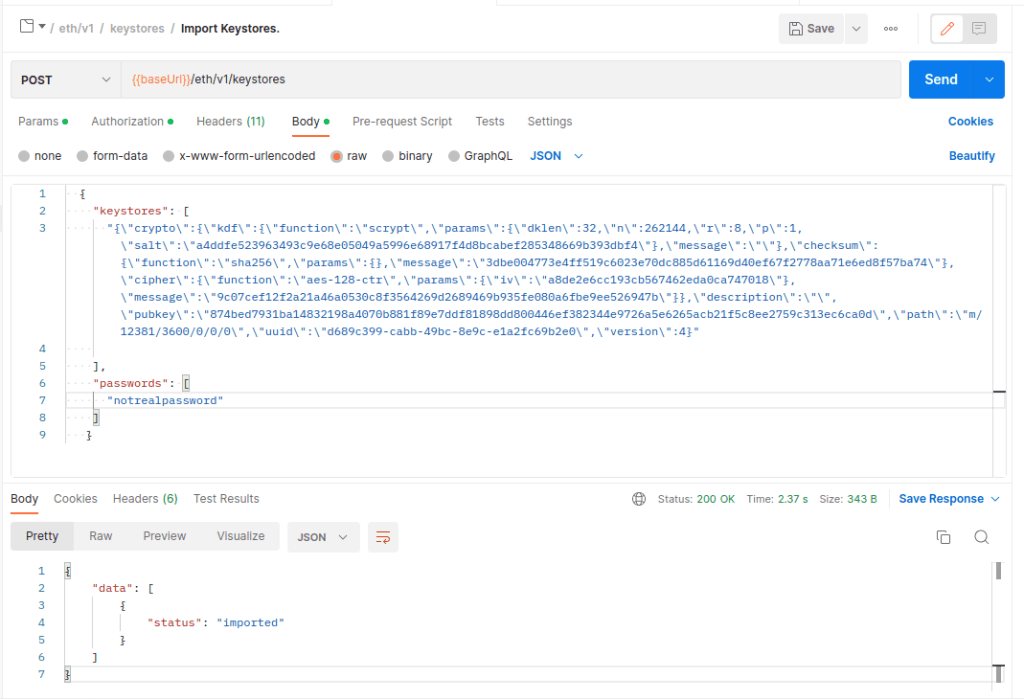
Under passwords we specify the password for the keystore and we remove the “slashing_protection” object. NOTE: we omit slashing_protection however it is very important in case of a real keystore that is migrated or re-used.
After clicking “Send” we should see “status”: “imported” in the response body.
We can confirm in the logs that the keystore was in fact imported:
{"msg":"Importing keystores via standard HTTP API","level":"INFO","ts":"2023-01-03T07:26:05.237290957Z","count":1}
{"msg":"No slashing protection data provided with keystores","level":"WARN","ts":"2023-01-03T07:26:05.237300654Z"}
{"msg":"Enabled validator","level":"INFO","ts":"2023-01-03T07:26:06.996236591Z","voting_pubkey":"0x874bed7931ba14832198a4070b881f89e7ddf81898dd800446ef382344e9726a5e6265acb21f5c8ee2759c313ec6ca0d","signing_method":"local_keystore"}
{"msg":"Modified key_cache saved successfully","level":"INFO","ts":"2023-01-03T07:26:07.573681758Z"}
{"msg":"Awaiting activation","level":"INFO","ts":"2023-01-03T07:26:07.57414527Z","service":"notifier","slot":"4685230","epoch":"146413","validators":1}
Let’s now delete the keystore we uploaded. Firstly let’s list the keys to get the exact format of the public key we need.
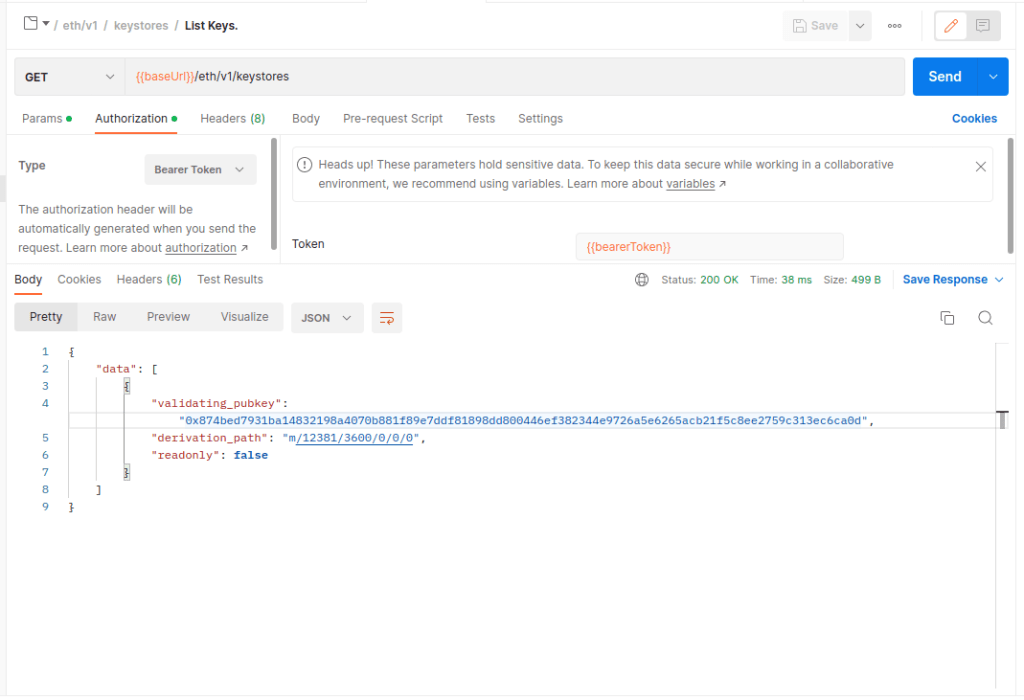
Now we can copy the key from the response, and paste it into the pubkeys array under the Delete Keys method, and hit send.
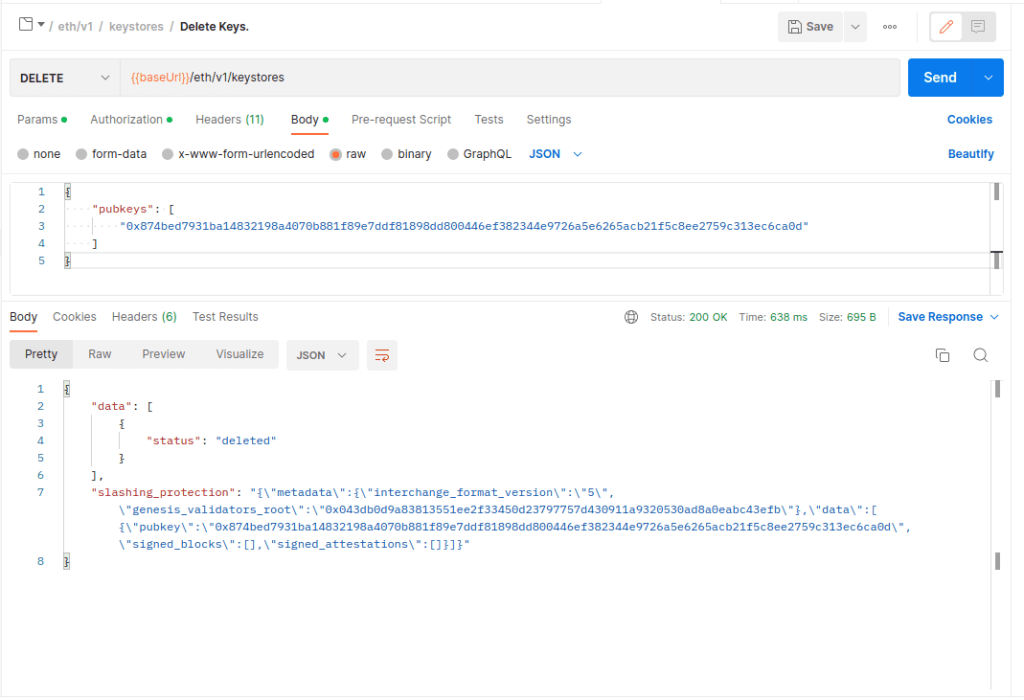
We can confirm in the logs that the key_cache was updated and that we do not have any validators present.
{"msg":"Modified key_cache saved successfully","level":"INFO","ts":"2023-01-03T09:52:54.146555633Z"}
{"msg":"No validators present","level":"INFO","ts":"2023-01-03T09:52:54.150444946Z","service":"notifier","msg":"see `lighthouse account validator create --help` or the HTTP API documentation"}
An important piece of data (that should be saved) in a real world scenario, is the slashing_protection data returned by the delete method. More on slashing protection here: https://lighthouse-book.sigmaprime.io/slashing-protection.html
"slashing_protection": "{\"metadata\":{\"interchange_format_version\":\"5\",\"genesis_validators_root\":\"0x043db0d9a83813551ee2f33450d23797757d430911a9320530ad8a0eabc43efb\"},\"data\":[{\"pubkey\":\"0x874bed7931ba14832198a4070b881f89e7ddf81898dd800446ef382344e9726a5e6265acb21f5c8ee2759c313ec6ca0d\",\"signed_blocks\":[],\"signed_attestations\":[]}]}"Remote Keystore
Remote keystore is managed by an external entity and the VC does not store or have access to it. The VC outsources the the cryptographic signing to a Remote Signer (RS). This has a number of potential benefits coming with a number of trade offs – there’s never a free lunch in IT security. That’s a topic for another post. All VCs currently support Web3Signer more info here: https://docs.web3signer.consensys.net/en/latest/.
As of writing Web3Signer can store the keys in HashiCorp Vault, AWS Secrets Manager, Azure Vault as well as in a basic Hardware Security Module (HSM).
In this setup the VC doesn’t hold the keys so we wouldn’t upload the keystore to a VC. We only need to tell the VC which public key the RS is responsible for and the API endpoint to call.
To import a remote keystore using Postman we navigate to eth2 “key manager API>eth/v1>remotekyes>Import remote keys” and open “Body” tab.
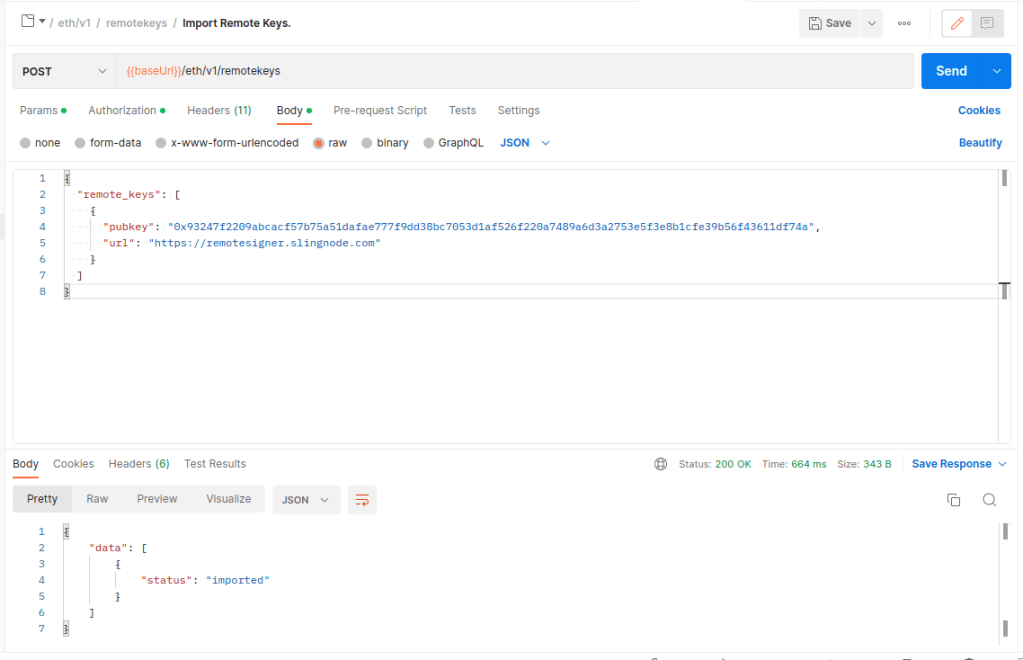
If the import was successful we’ll see “status”: “imported” in the response. We can confirm whether the import was successful in the logs.
{"msg":"Importing remotekeys via standard HTTP API","level":"INFO","ts":"2023-01-04T08:48:30.708618952Z","count":1}
{"msg":"Enabled validator","level":"INFO","ts":"2023-01-04T08:48:31.306455449Z","voting_pubkey":"0x93247f2209abcacf57b75a51dafae777f9dd38bc7053d1af526f220a7489a6d3a2753e5f3e8b1cfe39b56f43611df74a","signing_method":"remote_signer"}
In a normal use case we would expect to authenticate the API calls between the Validator Client and the Remote Signer. Web3Signer and the VC support TLS Client certificate authentication. In case of Lighthouse this is configurable in the validator_definitions.yml. See the doc for more details https://lighthouse-book.sigmaprime.io/validator-web3signer.html.
However, as of writing the Key Manager API does not support configuring authentication so that is something we’d need to do locally using our configuration management tools or using client specific API. See Lighthouse docs for info on the API https://lighthouse-book.sigmaprime.io/api-vc-endpoints.html#post-lighthousevalidatorsweb3signer
 SlingNode
Leave a comment